1. Introduction
This project implements a real-time industrial safety gear detection and compliance monitoring system using a custom-trained YOLO26x model on the Ultralytics Platform. The system detects workers in industrial environments, identifies their personal protective equipment (PPE), and classifies each individual's compliance status, showing visual warnings for missing safety gear.
Workplace safety enforcement matters in high-risk environments such as factories, construction sites, and manufacturing facilities. Manual inspection is slow and error-prone; this system automates PPE compliance monitoring with computer vision, running real-time safety audits on existing camera infrastructure.
It processes video streams to detect and track multiple workers at once and check each one for four safety equipment items.
Core Features:
- Real-time worker detection and centroid-based multi-person tracking
- 4-class PPE detection: helmet, safety vest, gloves, face mask
- Per-person equipment assignment via IoU and bounding box center analysis
- Compliance status classification: Compliant (green), Partial (orange), Non-compliant (red)
- Visual warning banner for workers wearing no equipment
- Annotated video recording with per-person equipment labels
- Custom-trained model: 97.1% mAP50, 94.6% Precision, 94.6% Recall
2. Methodology / Approach
The system employs a custom-trained YOLO26x model to simultaneously detect persons and safety equipment items within each video frame. A dedicated assignment algorithm then associates detected equipment with the nearest worker using spatial overlap metrics, and a centroid tracker maintains consistent person identities across frames.
2.1 System Architecture
The industrial safety gear detection pipeline consists of:
- YOLO Inference: Detect all instances of
person,helmet,safety-vest,gloves, andface-maskin each frame - Equipment Assignment: Map detected PPE items to their corresponding worker using IoU and center-in-box tests
- Person Tracking: Centroid-based tracker assigns persistent IDs across frames with configurable lost-track tolerance
- Compliance Assessment: Compare each worker's detected equipment set against the full required set
- Visualization: Color-coded bounding boxes and per-item labels; warning banner for zero-equipment workers
- Video Output: Annotated frames written to output video file
2.2 Processing Pipeline
[Video Input]
    ↓
[YOLO Detection] → [Persons + Equipment Detections]
    ↓
[Equipment-to-Person Assignment] (IoU + Center-in-Box)
    ↓
[Centroid Tracker] → [Persistent Track IDs]
    ↓
[Compliance Status Classification]
    ↓
[Bounding Box Rendering + Label Overlay]
    ↓
[Video Output]
2.3 Implementation Strategy
The implementation uses the Ultralytics YOLO framework for inference and OpenCV for video processing and annotation. Equipment assignment is performed using a two-stage scoring system: equipment whose center lies inside a person's bounding box receives an IoU bonus of +1.0, ensuring close spatial association is prioritized. The centroid tracker uses a greedy nearest-neighbor cost matrix weighted by both Euclidean distance and IoU overlap, tolerating up to 30 frames of lost detection before retiring a track.
3. Mathematical Framework
3.1 IoU & Equipment Assignment
Spatial overlap between equipment and person bounding boxes:
$$\text{IoU}(A, B) = \frac{\text{Area}(A \cap B)}{\text{Area}(A \cup B)}$$
Equipment is assigned to the person with the highest IoU score. If the equipment center lies inside the person's bounding box, a +1.0 bonus is added to prioritize close spatial association.
3.2 Centroid Tracking
Bounding box centers are used to match detections across frames:
$$c_x = \frac{x_1 + x_2}{2}, \quad c_y = \frac{y_1 + y_2}{2}$$
$$\delta = \sqrt{(c_x^{d} - c_x^{t})^2 + (c_y^{d} - c_y^{t})^2}$$
Assignments exceeding $\delta > 80$ pixels are rejected.
3.3 Performance Metrics
$$\text{Precision} = \frac{TP}{TP + FP}, \quad \text{Recall} = \frac{TP}{TP + FN}, \quad \text{mAP}_{50} = \frac{1}{N} \sum_{c=1}^{N} AP_c^{50}$$
4. Dataset
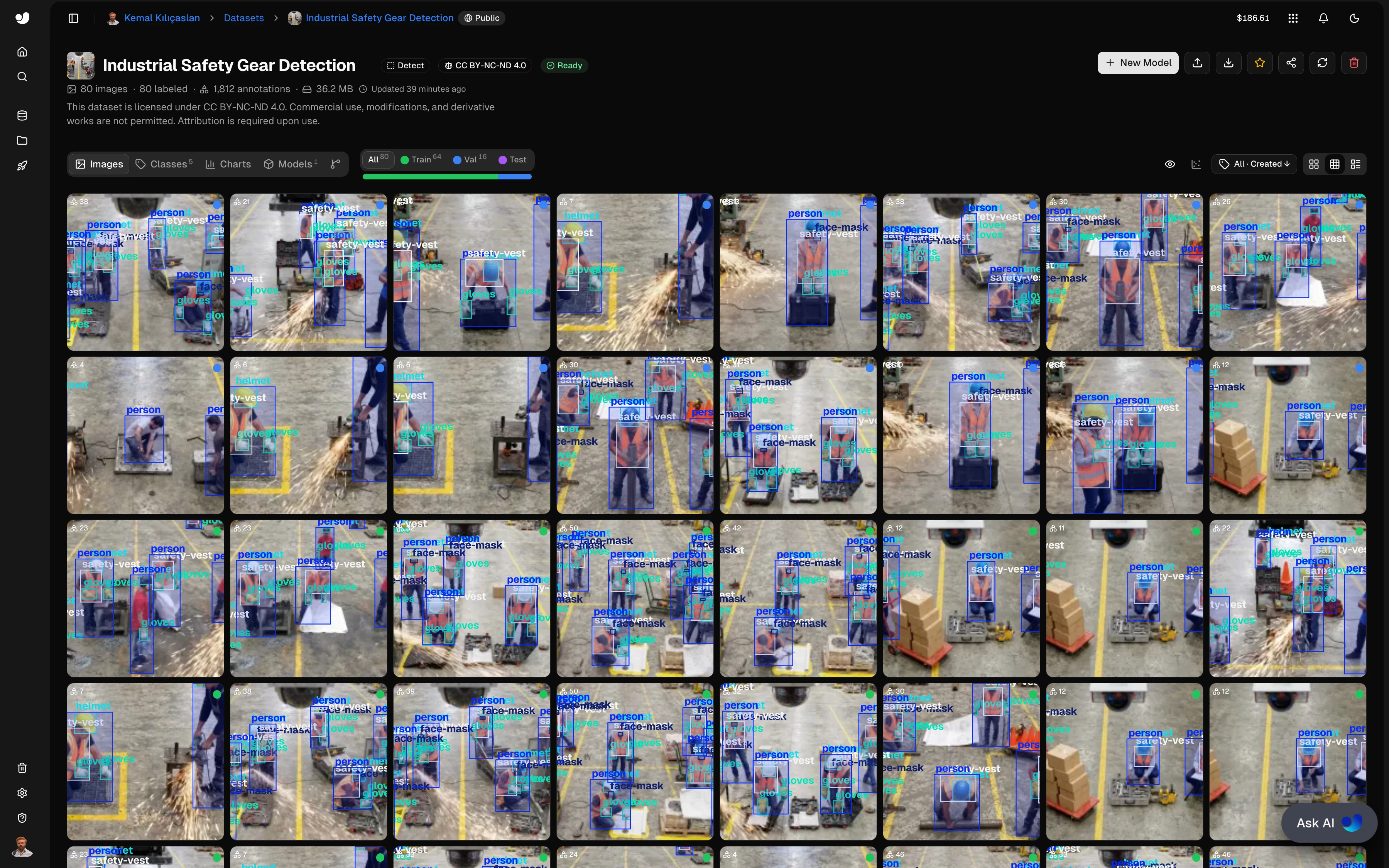
Dataset Name: Industrial Safety Gear Detection
Platform: Ultralytics Platform (Public)
License: CC BY-NC-ND 4.0
Total Images: 80
Total Annotations: 1,812
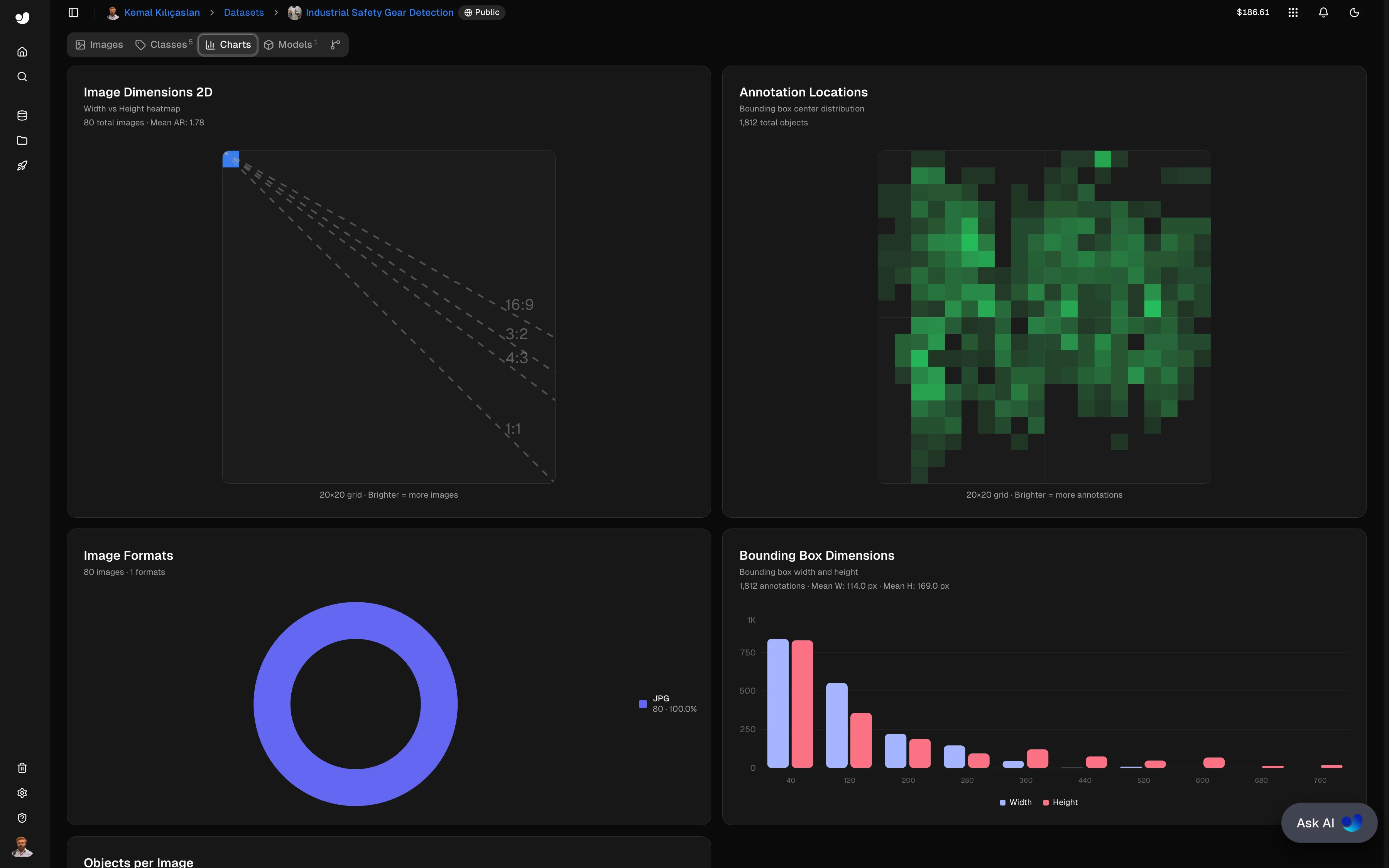
Image Format: JPG
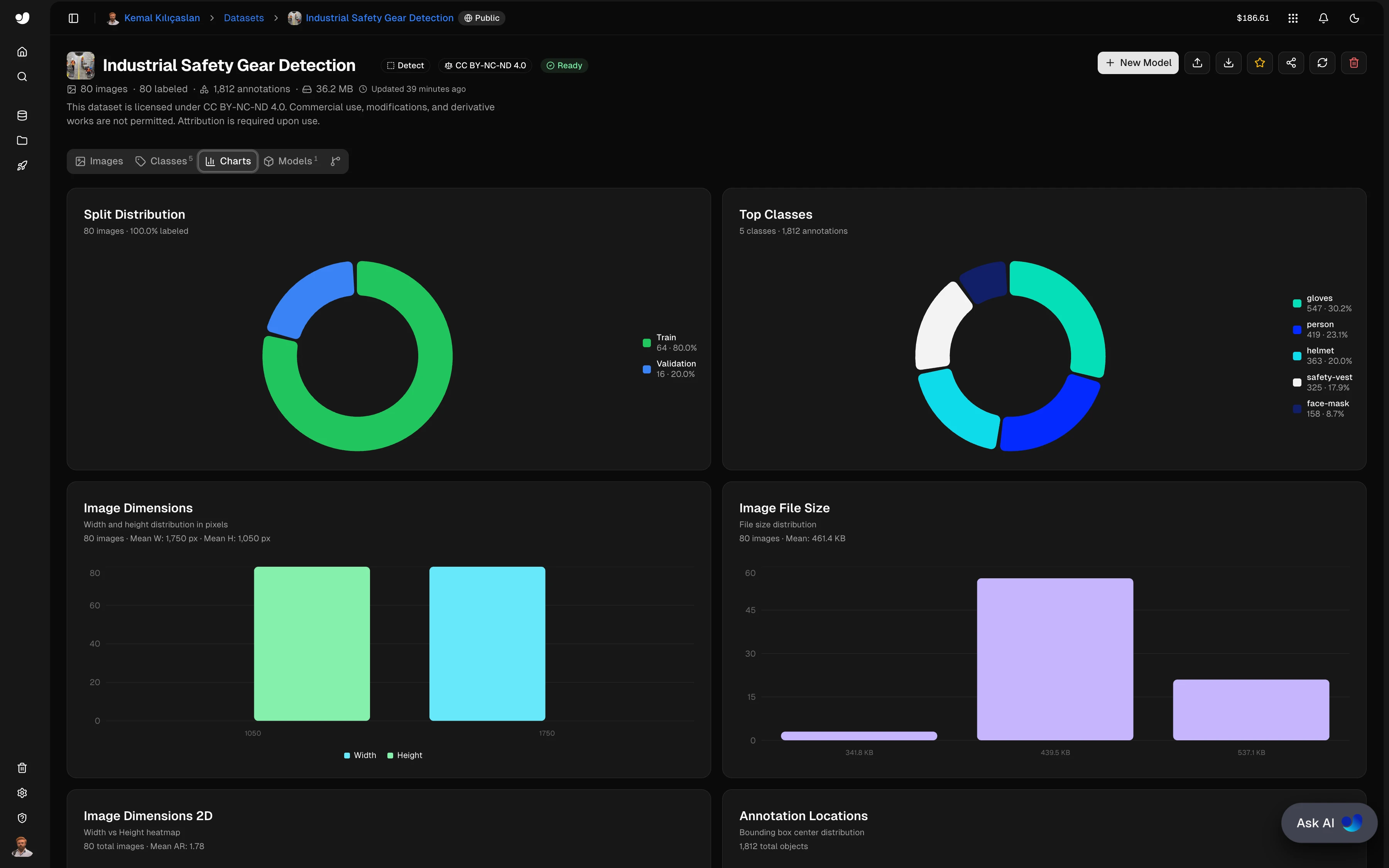
Mean Image Size: 1,750 × 1,050 px (Mean AR: 1.78)
Mean File Size: 461.4 KB
Split Distribution:
| Split | Images | Percentage |
|---|---|---|
| Train | 64 | 80.0% |
| Validation | 16 | 20.0% |
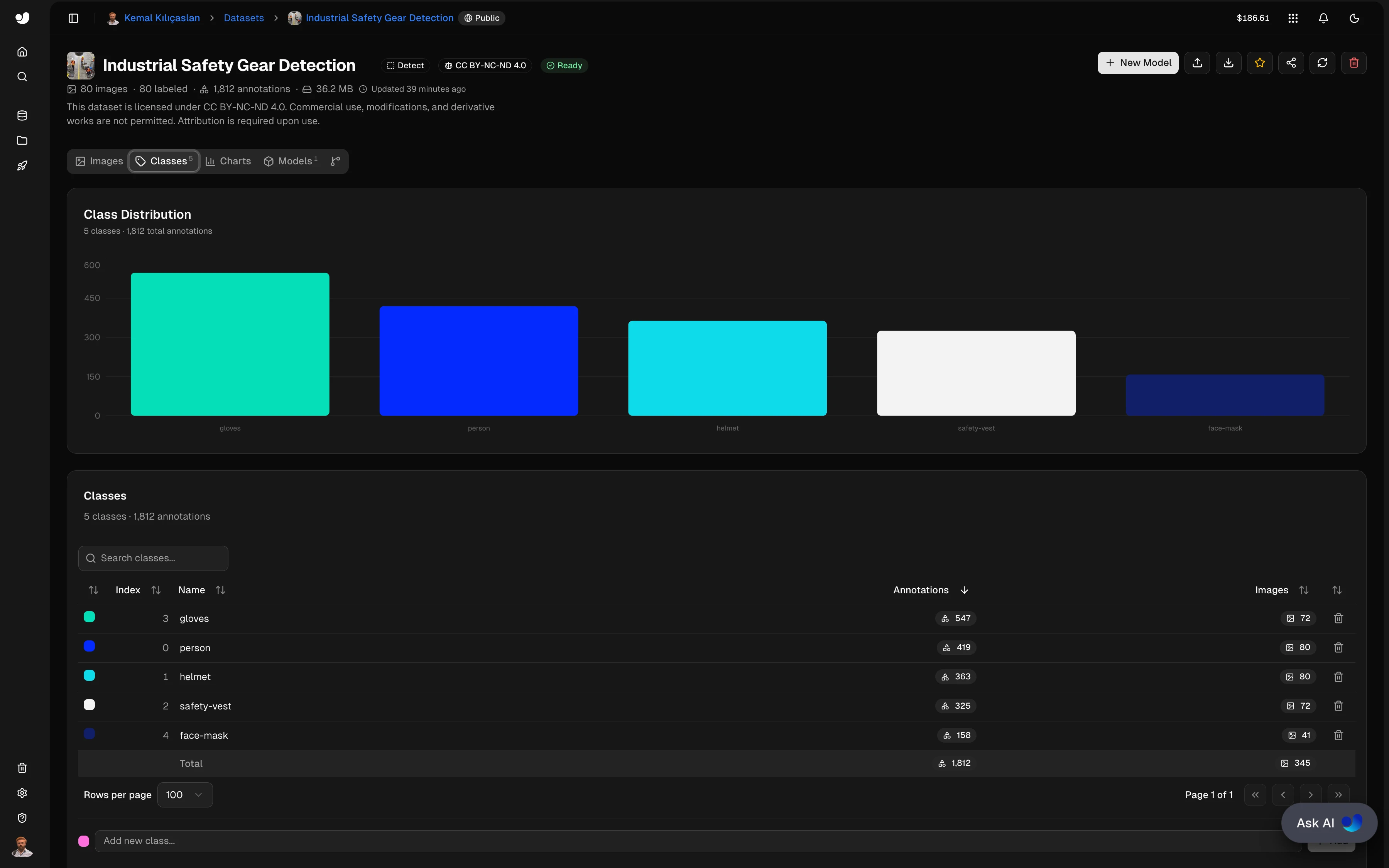
Class Distribution:
| Index | Class | Annotations | Images |
|---|---|---|---|
| 3 | gloves | 547 (30.2%) | 72 |
| 0 | person | 419 (23.1%) | 80 |
| 1 | helmet | 363 (20.0%) | 80 |
| 2 | safety-vest | 325 (17.9%) | 72 |
| 4 | face-mask | 158 (8.7%) | 41 |
| — | Total | 1,812 | 345 |
Bounding Box Statistics:
- Mean bounding box width: 114.0 px
- Mean bounding box height: 169.0 px
- Annotation locations: distributed across frame center and upper regions
5. Model
Model Name: industrial-safety-gear-detection.pt
Platform: Ultralytics Platform
License: AGPL-3.0
Architecture: YOLO26x (Ultralytics)
Training Epochs: ~300
Classes: 5 (person, helmet, safety-vest, gloves, face-mask)
Model Metrics:
| Metric | Value |
|---|---|
| mAP50 | 97.1% |
| mAP50-95 | 83.7% |
| Precision | 94.6% |
| Recall | 94.6% |
Training Convergence:
precision(B): stabilizes near 1.0 after ~50 epochsrecall(B): stabilizes near 1.0 after ~50 epochsmAP50-95(B): steady convergence to ~0.837 over 300 epochsbox_loss,cls_loss,dfl_loss: all converge smoothly with no signs of overfitting
6. Requirements
requirements.txt
opencv-python>=4.8.0
numpy>=1.24.0
ultralytics>=8.0.0
7. Installation & Configuration
7.1 Environment Setup
# Clone the repository
git clone https://github.com/kemalkilicaslan/Industrial-Safety-Gear-Detection-System.git
cd Industrial-Safety-Gear-Detection-System

# Install required packages
pip install -r requirements.txt
7.2 Project Structure
Industrial-Safety-Gear-Detection-System/
├── Industrial-Safety-Gear-Detection-System.py
├── config.py
├── Dockerfile
├── .dockerignore
├── docker-compose.yml
├── .gitignore
├── README.md
├── requirements.txt
└── LICENSE
7.3 Required Files
- Custom YOLO26x Model:
industrial-safety-gear-detection.pt(place in project directory) - Input Video: Industrial environment video file (MP4, AVI, MOV)
8. Usage / How to Run
8.1 Basic Execution
python Industrial-Safety-Gear-Detection-System.py8.2 Configuration Parameters
All adjustable parameters live in config.py. Update them there without touching the main script:
# Model and class configuration
MODEL_PATH = "industrial-safety-gear-detection.pt"
EQUIPMENT_CLASSES = {"helmet", "safety-vest", "gloves", "face-mask"}
PERSON_CLASS = "person"

# Detection thresholds
CONF_THRESH = 0.15    # Confidence threshold for YOLO inference
IOU_THRESH  = 0.15    # Minimum score for equipment-to-person assignment
MAX_LOST    = 30      # Frames before retiring a lost track
DIST_THRESH = 80.0    # Max centroid distance (px) for track matching
8.3 Input / Output
# Set these in config.py for your video
INPUT_VIDEO  = "Industrial-Safety-Gear.mp4"
OUTPUT_VIDEO = "Industrial-Safety-Gear-Detection.mp4"
8.4 Controls
- Press
qto quit the application during playback
8.5 Compliance Color Coding
| Status | Color | Condition |
|---|---|---|
| Compliant | 🟢 Green (50, 220, 50) |
All 4 equipment items detected |
| Partial | 🟠 Orange (30, 165, 255) |
At least 1 item detected, at least 1 missing |
| Non-compliant | 🔴 Red (40, 40, 220) |
No equipment detected — "EQUIPMENT: NONE" banner |
9. Docker Deployment
The system can be packaged and run in a container so that the code, its dependencies and the runtime environment stay consistent across machines.
Files
Dockerfile- builds the image (Python 3.11 + OpenCV/ffmpeg system libraries + Python dependencies)..dockerignore- keeps large media and model files out of the build context.docker-compose.yml- runs the container and mounts the project folder for input/output.
Build and run
docker compose up --build

# or with the Docker CLI directly
docker build -t industrial-safety-gear-detection:latest .
docker run --rm -v "$(pwd)":/app industrial-safety-gear-detection:latest
Notes
- Input and output files are read from and written to the project folder through the bind mount, so results appear on the host after the run.
- The detection model weight (
.pt) bundled in the repository is used through the bind mount; any standard YOLO weight is downloaded automatically on first run. - The script calls
cv2.imshow, which needs a graphical display. On a headless server the output files are still written to disk; the live preview window is only available on Linux with X11 forwarding (see the commented lines indocker-compose.yml).
10. Application / Results
10.1 Input Video
Industrial Safety Gear:
10.2 Output Video
Industrial Safety Gear Detection:
10.3 Dataset Overview
Dataset & Charts:
Class Distribution:
Dataset Charts 1:
Dataset Charts 2:
10.4 Model Metrics
Training Metrics & Loss Curves:
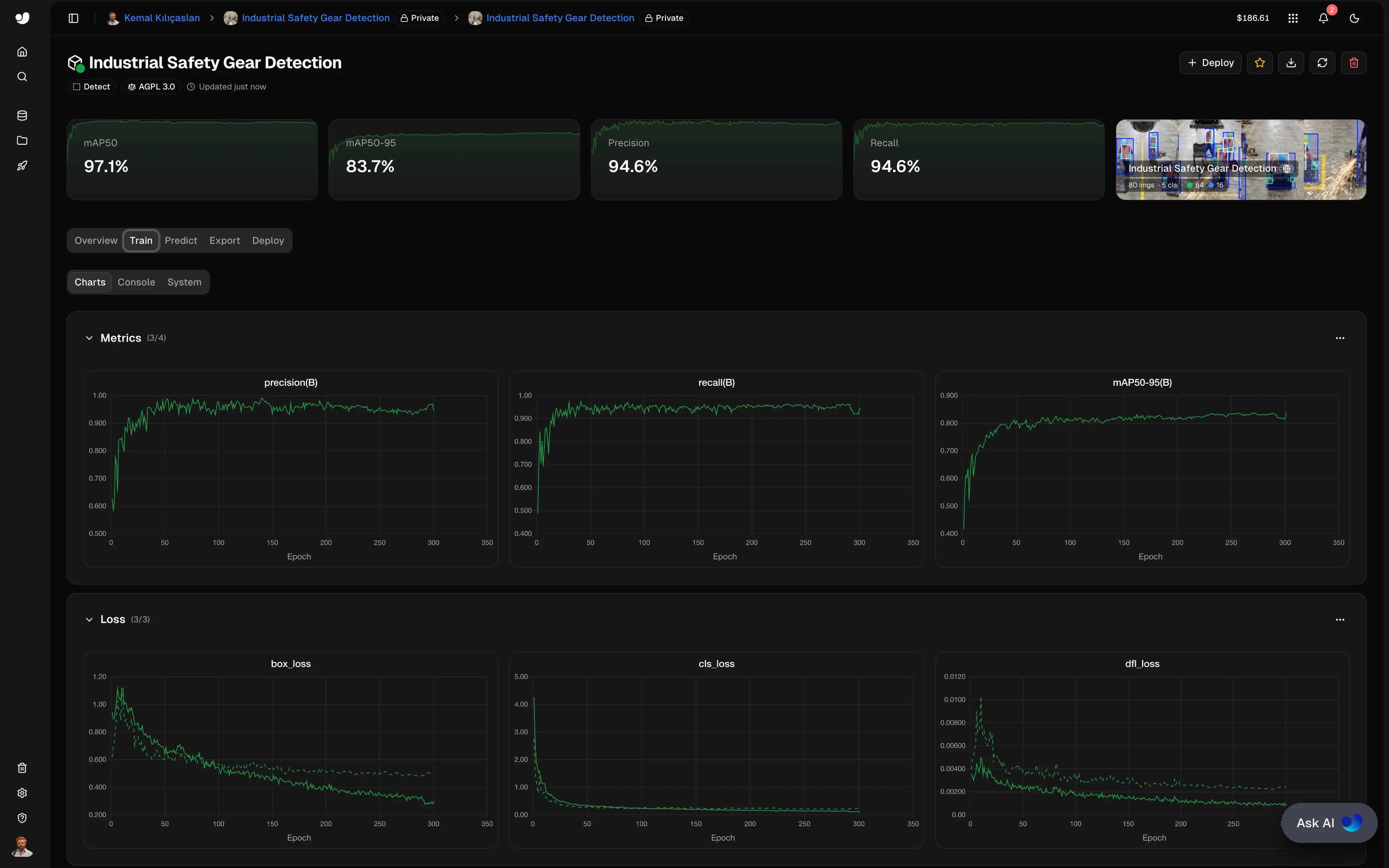
mAP50: 97.1% | mAP50-95: 83.7% | Precision: 94.6% | Recall: 94.6%
11. Tech Stack
11.1 Core Technologies
- Programming Language: Python 3.8+
- Computer Vision: OpenCV 4.8+
- Deep Learning Framework: Ultralytics YOLO 8.0+
- Numerical Computing: NumPy 1.24+
- Training Platform: Ultralytics Platform
11.2 Libraries & Dependencies
| Library | Version | Purpose |
|---|---|---|
| opencv-python | 4.8+ | Video I/O, bounding box rendering, blending |
| ultralytics | 8.0+ | YOLO26x model inference |
| numpy | 1.24+ | Array operations, cost matrix computation |
11.3 Algorithm Components
| Component | Method | Purpose |
|---|---|---|
| Object Detection | Custom YOLO26x | Detect persons and 4 PPE classes |
| Equipment Assignment | IoU + Center-in-Box scoring | Map PPE to correct worker |
| Person Tracking | Centroid tracker (greedy NN) | Maintain persistent worker IDs |
| Compliance Check | Set difference | Determine missing equipment |
| Visualization | OpenCV overlay | Color-coded boxes and labels |
11.4 Detection Parameters
| Parameter | Value | Description |
|---|---|---|
| Confidence Threshold | 0.15 | YOLO inference confidence |
| IoU Threshold | 0.15 | Min assignment score |
| Max Lost Frames | 30 | Track retirement tolerance |
| Distance Threshold | 80.0 px | Max centroid matching distance |
12. License
This project is licensed under the Creative Commons Attribution-NonCommercial-NoDerivatives 4.0 International (CC BY-NC-ND 4.0).
13. References
- Ultralytics Platform Documentation: Model training, inference, and deployment.
- Ultralytics Platform Industrial Safety Gear Detection: Dataset annotation, training, and export.
- OpenCV Video I/O and Drawing Functions Documentation.
Acknowledgments
Thanks to the Ultralytics team for the YOLO framework and Ultralytics Platform, used here for dataset annotation, model training, and export. Thanks to the OpenCV community for their real-time video processing tools.
Note: This system is designed for research, educational, and authorized industrial safety monitoring purposes. When deploying in production environments, ensure compliance with local privacy regulations regarding workplace video surveillance. Detection accuracy may vary depending on camera angle, occlusion, and lighting conditions. Regular model retraining with site-specific data is recommended for optimal performance.